Ethernet Connection:
1. Check that the ethernet cable connected to the WAN port provides a reliable connection. You can do this by connecting the cable to a PC and checking the network connection.
2. Check that the router’s Ready LED is on and that the network LEDs are blinking.
SIM Card Connection:
1. Verify that the SIM card provides a reliable connection by using a phone or another device that support SIM cards.
2. (DX2400 only) Check that the SIM card PIN is greater than 1000; PIN values lower than 1000 (e.g. 0823) can, sometimes, cause the router to be unable to activate the SIM.
Firewall Rules:
If the router is being used in a firewall-secured network, for example, inside a company building, the network administrator might need to adjust the firewall policy.
Delta DX Routers communicate with DIACloud via the following IP addresses and ports, so make sure they are open:
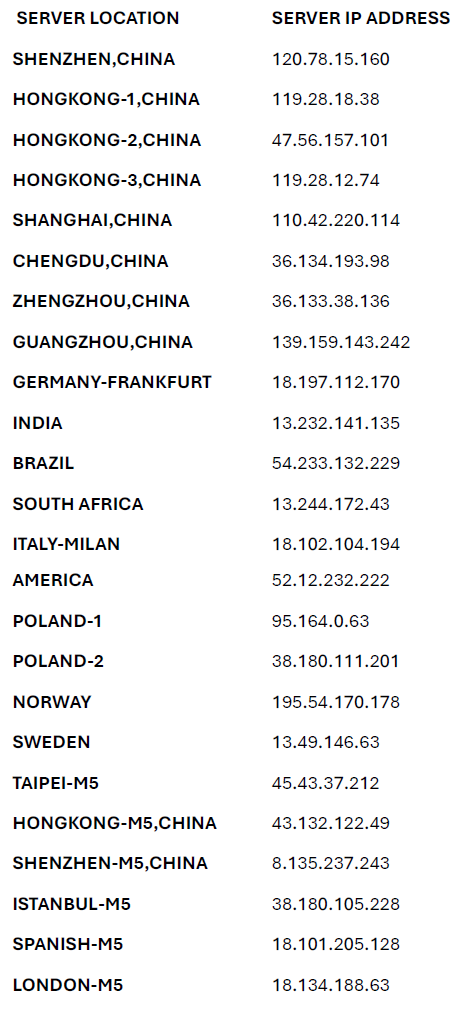
TCP/UDP Ports: 80, 443, 22000, 10001, 22001, 22003, 22012, 22013, 22015, 22016, 22018, 5050
 Delta Industrial Automation EMEA