How do I check direction of auxiliary (linear scale) encoder in Full-Closed loop in ASDA-Soft?
Basically, full-closed loop is using 2 encoders in the control loop to operate the servo system. The main encoder and the auxiliary encoder. The auxiliary encoder returns the actual position of the machine end to the servo drive in the full-closed loop system. The main encoder returns attached directly to the motor and gives the actual motor position.

To make the Full Closed Loop system work properly. The direction of encoder feedback of the main encoder and the auxiliary encoder should be in the same direction. If they are not in the same direction, we can set parameter P1.074.Z to reverse the direction of the auxiliary encoder feedback.
Checking that the 2 encoders are on the same direction or not can be done by the scope in ASDA-Soft.
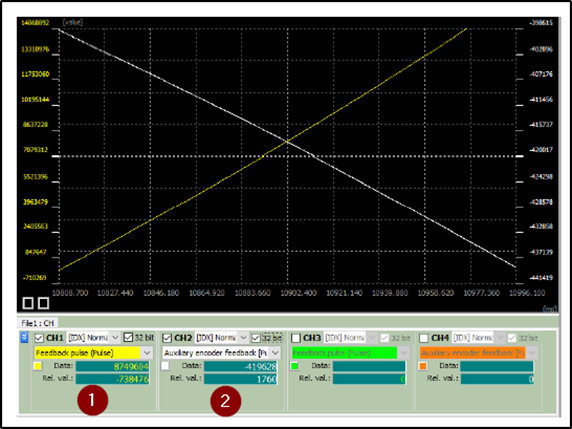
Open the scope and configure the first channel to show “Feedback Pulse (Pulse)” and the second channel to show “Auxiliary encoder feedback (Pulse)”, be sure that channels are configured as 32 bit.
Run the scope then rotate the motor for one revolution by hand or by PR path. If the two encoders are in the same direction, their lines will be above each other or parallel. If they are perpendicular or crossing each other at some point, then the 2 encoders are not in the same direction and parameter P1.074.Z should be changed.
 Delta Industrial Automation EMEA