In the AH PLC’s ModbusTCP data exchange table, each configuration creates a single TCP connection. When you attempt to connect to this kind of 3rd party device, it will refuse 2nd connection.
Please follow the steps below to resolve the issue:
- Open Hardware configuration\Data Exchange\ Ethernet, select “Program Control” mode
2. Setup the data exchange table and enable the connections.
In this case, the AH PLC connect 3 different 3rd party devices, the IP address is 192.168.10~12. Each 3rd party device contains 3 connections.

3. You can control SM700~SM827 (Enable data exchange for connection via Modbus TCP) in the PLC program to enable or disable the connection.
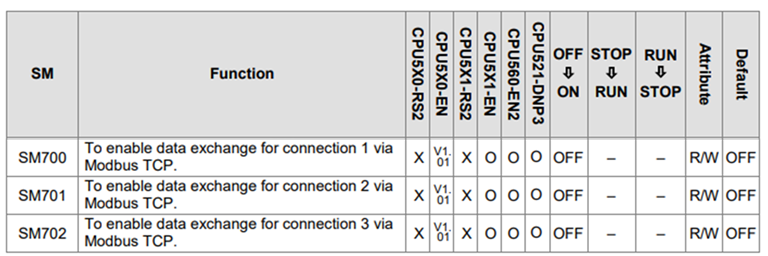
You can find the SM700~ SM827 detailed information in AH500 Programming Manual
Delta | Download Center (deltaww.com)
4. Create a POU and write a simple program to enable the connections in different time period.
In this case, we use SM406 with a 100ms ON/100ms OFF cycle (1 cycle 200ms) to separate each connection.
In the 1st 200ms cycle, E1=0, and turn ON connections 1, 4&7 for 100ms.
In the 2nd 200ms cycle, E1=1, and turn ON connections 2, 5&8 for 100ms.
In the 3th 200ms cycle, E1=2, and turn ON connections 3, 6&9 for 100ms.
In the 4rd 200ms cycle, E1=0, and turn ON connections 1, 4&7 for 100ms.

Note: In this case, we use an SM406 cycle of 100ms ON/100ms OFF to control the connections. You need to consider the two settings in the “Data Exchange Setting”:
“The Short Update Cycle (ms)”: It needs to be smaller than 100ms (ON).
“Connection timeouts”: It needs to be smaller than 100ms (OFF).


