Devices and Tools:
– DVP12SE11R
– C2000
– ISPSoft 2.04
Operation Steps:
1. Setup C2000 parameters to be able to communicate with PLC.
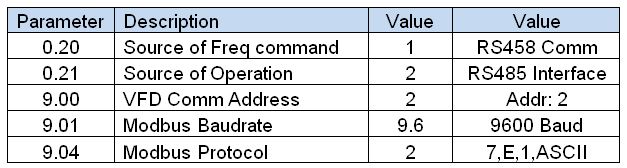
2. Configure DVPSE COM2 Accordingly using COM2 FB
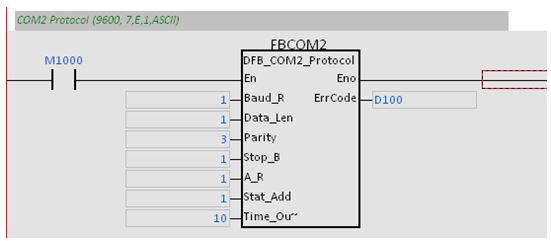
3. Open ISPSoft, and double Click on NWConfig.
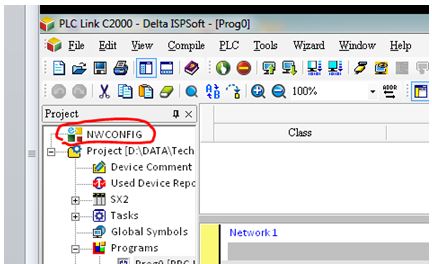
4. Check below link video, and follow instructions.
full screen is recommended
5. Turn On PLCLink meanwhile PLC is in RUN
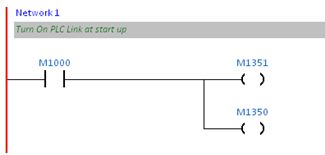
M1350 = PLCLink On
M1351 = Auto mode On
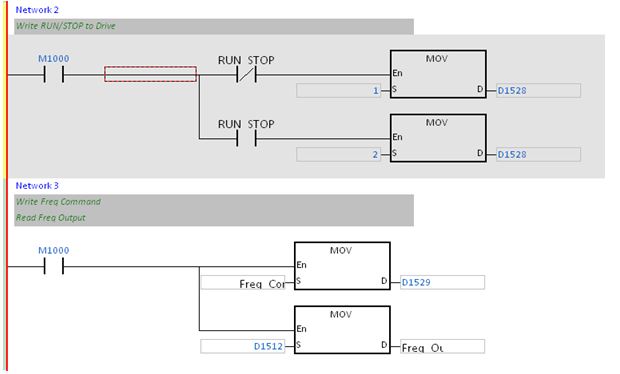
6. Setup RUN/STOP and Frequency Read Write according to below program
Useful Tricks:
1. Double check positive and negative wiring is very common to swap them by error.
2. Check If the RS485 led on DVPSE is blinking to check if PLCLink is polling.
3. Use NWConfig Monitor tool before use the program, to check everything is all right.
 Delta Industrial Automation EMEA